Express.js, the fun way
Six short stops, one goal: by the bottom of this page you'll have built a working REST API for your anime list — running live, right here in the browser. Less reading, more playing. 🚂
0 The 30-second why
const http = require('http');
http.createServer((req, res) => {
  if (req.url === '/' && req.method === 'GET') {
    res.writeHead(200, { 'Content-Type': 'text/plain' });
    res.end('Hi!');
  } else {
    res.writeHead(404); res.end('Nope');
  }
}).listen(3000);const express = require('express');
const app = express();
app.get('/', (req, res) => res.send('Hi!'));
app.listen(3000);Express gives you four superpowers: routing, middleware, convenience methods (res.send, res.json…) and views. We'll play with all four.
How to play: every 🚂 express emulator block is a real server running in this page. Press Run, then poke it with the REST tester that appears. Edit the code and run again — nothing to install.
1 Hello, Express 👋
const express = require('express');   // 1. grab Express
const app = express();                // 2. make an app

// 3. answer GET / with a message
app.get('/', (req, res) => {
  res.send('Welcome to the Anime Archive! 🎬');
});

// 4. open the door on port 3000
app.listen(3000, () => console.log('server up on :3000'));Four lines and you have a server. res.send() even sets the status code and headers for you. That's the whole pitch. 🎉
2 Middleware 🎢
Middleware = a function (req, res, next) your request rides through on the way to the answer. Each one does its bit, then calls next() to send the request onward.
Logger
app.use(log)Auth check
app.use(auth)express.json()
parse bodyRoute handler
res.send()Now for real: this logger runs on every request and tags it before the routes even see it. Run it and visit a couple of paths — watch the console.
const express = require('express');
const app = express();

// runs on EVERY request, then hands off with next()
app.use((req, res, next) => {
  console.log('👀 ' + req.method + ' ' + req.url);
  req.hero = 'Saitama';   // stash something for the routes to use
  next();          // ⬅️ forget this and the request hangs forever
});

app.get('/', (req, res) => res.send('Home — today\'s hero: ' + req.hero));
app.get('/anime', (req, res) => res.send('Anime list, brought to you by ' + req.hero));

app.listen(3000);The #1 Express gotcha: forget next() and the request just… stops. The browser spins forever. Delete it above and visit a page to feel the pain. Two built-ins you'll use forever: express.json() (fills req.body) and express.static('public') (serves your HTML/CSS/images).
3 Routes & params 🎯
Play with the matcher — type a route pattern and a URL, watch Express pull out the params (or 404):
And here it is live — run it, then visit /anime/7 or /anime/42:
const express = require('express');
const app = express();

app.get('/', (req, res) =>
  res.send('<h1>Home</h1><a href="/anime/1">go to anime #1</a>'));

// :id is a route parameter → req.params.id
app.get('/anime/:id', (req, res) => {
  res.send('You asked for anime #' + req.params.id + ' 🎬');
});

app.listen(3000);4 req & res cheat card 🎴
| Read from req | Send with res |
|---|---|
| req.params — /anime/:id | res.send(html) — text/HTML |
| req.query — ?sort=asc | res.json(obj) — API responses |
| req.body — POST data (needs express.json) | res.status(404) — chainable |
| req.method · req.ip | res.render(view, data) — Pug |
Quick play — run it, then visit /search?q=titan&sort=year and watch req.query come back as JSON:
const express = require('express');
const app = express();

app.get('/search', (req, res) => {
  if (!req.query.q) {
    return res.status(400).json({ error: 'add ?q=titan to search the anime list' });
  }
  res.json({ searchingFor: req.query.q, sortedBy: req.query.sort || 'default' });
});

app.get('/', (req, res) => res.send('try /search?q=titan&sort=year'));

app.listen(3000);5 Boss level: build a REST API ⭐
Here's a complete, in-memory anime API — Model (an array), Controller (the routes), all in one. Run it, then use the tester's method dropdown to poke it. The data really changes between requests. This is the main event. 🎮
const express = require('express');
const app = express();
app.use(express.json());          // so POST bodies land in req.body

// 🗂️ our "database" — just an array
let anime = [
  { id: 1, title: "Death Note", studio: "Madhouse" },
  { id: 2, title: "Fullmetal Alchemist: Brotherhood", studio: "Bones" },
  { id: 3, title: "Attack on Titan", studio: "Wit Studio" }
];
let nextId = 4;

app.get('/anime', (req, res) => res.json(anime));          // read all

app.get('/anime/:id', (req, res) => {                       // read one
  const show = anime.find(a => a.id === Number(req.params.id));
  if (!show) return res.status(404).json({ error: 'not found' });
  res.json(show);
});

app.post('/anime', (req, res) => {                          // create
  const show = { id: nextId++, title: req.body.title, studio: req.body.studio };
  anime.push(show);
  res.status(201).json(show);
});

app.delete('/anime/:id', (req, res) => {                    // remove
  anime = anime.filter(a => a.id !== Number(req.params.id));
  res.json({ deleted: req.params.id, left: anime.length });
});

app.listen(3000, () => console.log('anime API ready — GET /anime'));Try this run, in order:
① GET /anime (3 shows) →
② switch to POST, send the default body (Demon Slayer) →
③ GET /anime again — it's there! →
④ DELETE /anime/1.
Mini-quest: add a PUT /anime/:id route that changes a show's studio. You've got this. 💪
6 Views with Pug 🐶
Best learned by playing. Edit the Pug on the left, change the data box, watch the page rebuild live:
To use it in Express: tell the app you're using Pug, then res.render() a view with data. That's the V in MVC (Model = your array, Controller = the route, View = the Pug). Run it and visit /:
const express = require('express');
const app = express();
app.set('view engine', 'pug');    // 1. use Pug

const shows = ['Death Note', 'Demon Slayer', 'One Punch Man'];

app.get('/', (req, res) => {
  // 2. render the "index" view with data → finished HTML
  res.render('index', { name: 'Class', items: shows });
});

app.listen(3000);Learning Pug from existing HTML? Paste it into html-to-pug.com. Layouts share one shell with extends + block — try adding a(href="/") Home to the playground above.
Put it all together — the guided project
Guided MVC projectThe Anime Collection app
A complete little app — Express Router, Pug views & layout, forms, and full CRUD (list · view · add · delete). Play the finished app live in your browser, then build it file by file. Every source file is downloadable.
Open the project →7 Wrap-up & quiz
- express() makes an app; app.listen(port) starts it — a server in 4 lines.
- Middleware is (req, res, next) — do your thing, then call next() or it hangs.
- Routes are app.METHOD(path, handler); :params → req.params, query → req.query, body → req.body.
- REST: GET read · POST create · PUT update · DELETE remove — one resource, four verbs.
- res.render() + Pug turn a template + data into HTML — the View in MVC.
Quick self-check (6 questions)
Q1. A middleware runs but never calls next() (and never responds). What happens?
Q2. Which registers a handler for POST to /anime?
Q3. Route /anime/:id gets a request for /anime/42. Where's "42"?
Q4. To read a JSON POST body from req.body, you first need…
Q5. In REST, which verb creates a new resource?
Q6. res.render('index', data) does what?
Go deeper (optional): Express docs · routing guide · Pug docs — plus the Zybooks Express sections for the lab.
8 Tips, tricks & fun facts 🎁
Pro tips (steal these)
- Order is everything. Middleware & routes run top-to-bottom, first match wins. Put express.json() and loggers before your routes, and your 404 handler last.
- Route params are strings. req.params.id is "1", not 1 — wrap it in Number() before comparing (exactly what the anime API does).
- Chain your reply. res.status(201).json(data) sets the code and the body in one clean line.
- Split big apps. One express.Router() per feature (an /anime router, a /users router) keeps app.js tiny.
- Never restart by hand. nodemon app.js (from Week 10) auto-reloads the server every time you save.
- Always catch the 404. End with app.use((req, res) => res.status(404).send('Not found')) so stray URLs get a friendly answer.
Sneaky gotcha: a greedy /anime/:id placed above /anime/new will swallow the word "new" as an id. Specific routes first, wildcards last — Titans don't wait their turn, but your routes must. 🎯
Fun facts to flex
Older than most of the web you use
Express launched in 2010 (by TJ Holowaychuk) and is still one of the most-depended-on packages on npm. It's the "E" in the MERN & MEAN stacks.
Pug used to be "Jade"
The template engine was renamed in 2016 over a trademark clash. Old tutorials say Jade — it's the exact same thing, new name.
One thread, thousands of fans
Thanks to Week 9's event loop, a single Express process serves thousands of visitors at once — no new thread per request. Saitama-level efficiency. 👊
app.get has a double life
app.get('/path', handler) adds a route, but app.get('view engine') reads a setting. Same name, two totally different jobs.
You made it! 🎉 You built a real REST API, wired up middleware, and rendered a Pug view — all in your browser. Take these tricks into the lab and give your anime API a PUT route. See you on the next island. 🚂
9 Cheat-sheet posters 📄
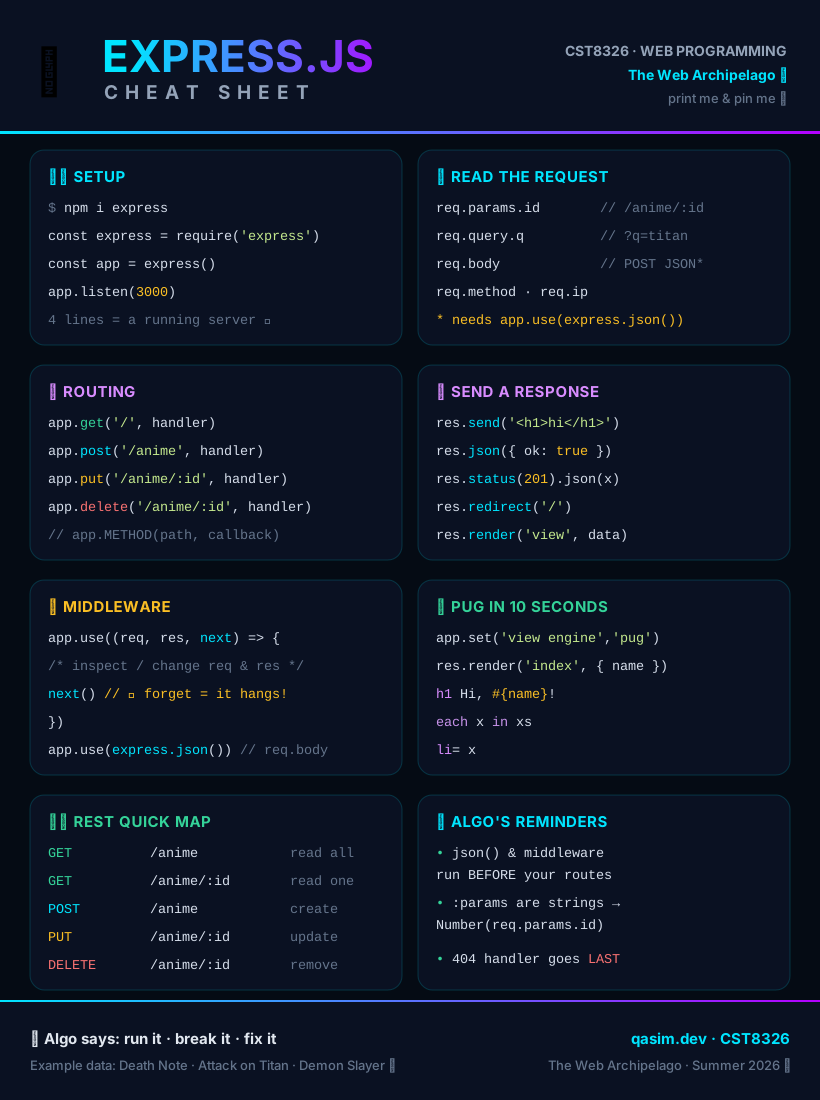
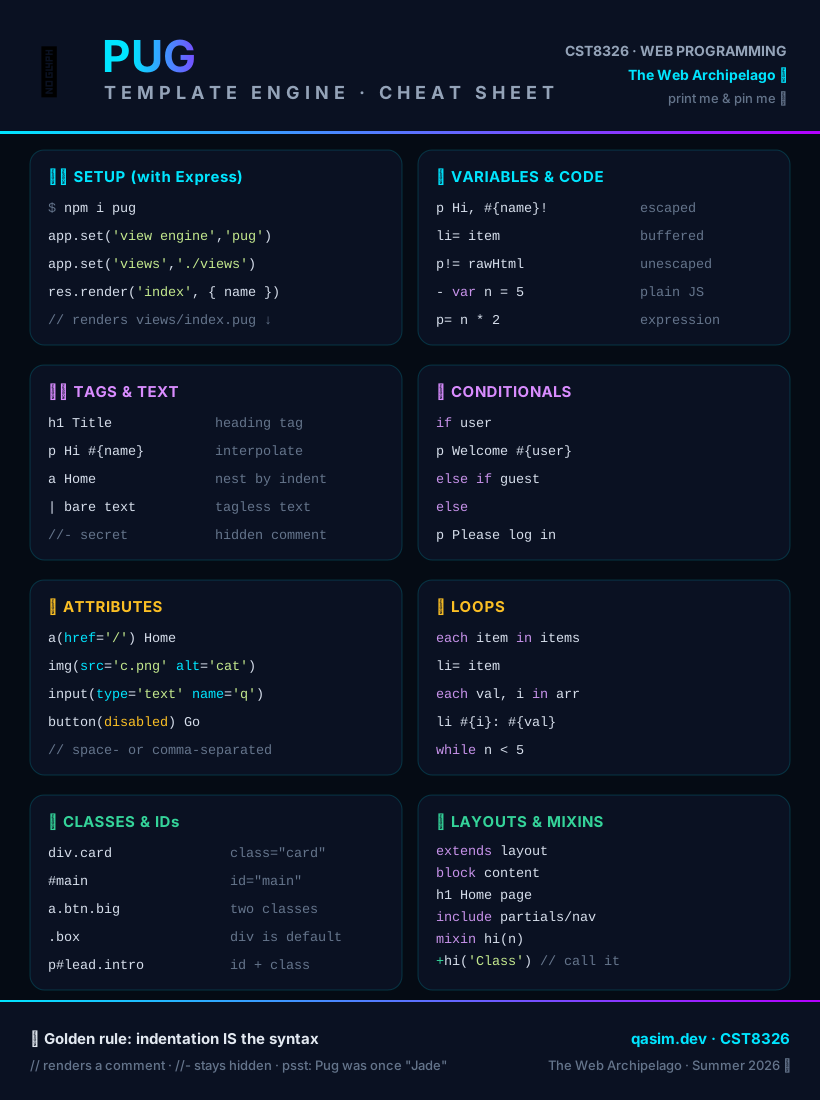
Both are SVG — crisp at any size, each prints on a single page, dark-mode friendly. 🖨️